
Delta Executor has quickly become one of the most advanced and trusted Roblox executors available today.
Designed for mobile and desktop users who want full control over their Roblox experience, Delta delivers powerful script execution, fast performance, and modern security across iOS, Android, and macOS.
In this complete guide, you will learn exactly what Delta Executor is, how it works, why players use it, how Roblox scripts function, and how to safely install Delta Executor on iOS 26, Android, and macOS using the download source at Delta BZ.
This guide is written for beginners and advanced users alike, with step by step instructions, clear explanations, and realistic risk awareness so you can make informed decisions.
What Is Delta Executor
Delta Executor is a Roblox script executor that allows users to inject and run Lua scripts inside Roblox games. These scripts can modify gameplay behavior, automate actions, unlock advanced features, and provide tools that are not available in the standard Roblox client.
Unlike older executors that only worked on Windows PCs, Delta Executor is built with modern mobile and cross platform support in mind. It supports iOS devices without requiring a computer, Android devices through APK installation, and macOS through native builds and sideloading workflows.
Delta Executor focuses on three core pillars:
- Secure execution using modern encryption
- High performance script injection
- Wide compatibility across devices and operating systems
What Is a Roblox Executor and Why People Use Them
A Roblox executor is a tool that injects external code into the Roblox game client while it is running. Roblox itself is built on the Lua programming language, which makes it highly customizable but also exploitable through scripts.
Players use executors for many reasons, including:
Executors like Delta do not modify Roblox servers directly. They operate on the client side, which means scripts affect what the player sees and how their game behaves.
Understanding Lua Scripts in Roblox
Lua is a lightweight programming language used by Roblox for game logic, physics, UI, and interactions. Roblox developers use Lua to build everything from movement systems to inventories and abilities.
Lua scripts used in executors generally fall into these categories:
Automation Scripts
Scripts that automatically perform actions such as collecting resources, attacking enemies, or completing quests without manual input.
Utility Scripts
Scripts that add quality of life improvements like faster movement, no clip, infinite jump, or anti AFK protection.
Visual Scripts
ESP scripts that highlight players, items, enemies, or objectives through walls or across the map.
GUI Scripts
Scripts that load full user interfaces with sliders, toggles, and menus for advanced control.
Custom Scripts
User written Lua scripts created for learning, testing, or private use.
Delta Executor supports both prebuilt scripts and custom Lua scripts, giving users full flexibility.
Why Choose Delta Executor
Delta Executor stands out due to its balance of power, usability, and security.
Secure Installation
Delta uses advanced encryption and verification processes to ensure files are clean and protected from tampering. This reduces the risk of malicious payloads commonly found on fake executor sites.
Regular Updates
Roblox updates frequently, and executors must adapt quickly. Delta pushes regular updates to maintain compatibility, fix bugs, and improve stability.
Wide Compatibility
Delta supports iOS 12 and newer, including iOS 26, modern Android devices, and macOS. This makes it one of the few executors with true cross platform reach.
Fast Downloads
With an optimized global CDN, downloads from delta.bz are fast and reliable across regions.
No Computer Required for iOS Direct Install
Delta offers direct installation methods on iOS, eliminating the need for a PC or Mac in many cases.
Supported Platforms
Delta Executor is available for:
- iOS 12.0 and newer, including iOS 26
- Android 7.0 and newer
- macOS devices
Each platform has different installation methods, which are covered in detail below.
How to Install Delta Executor on iOS 26
iOS has stricter security than Android, but Delta offers multiple installation methods depending on your setup and preferences.
Method 1, Direct Install on iOS
This is the easiest method and does not require a computer.
- Open Safari on your iPhone or iPad
- Visit Delta BZ to grab the IPA or APK file. OR USE THE BUTTON BELOW!
- Tap the Direct Install button
- When prompted, tap Install on the configuration profile
- Open Settings
- Go to General, then VPN & Device Management
- Select the Delta developer profile
- Tap Trust
- Return to your home screen and launch Delta Executor
Delta Executor For macOS
You can download the Delta executor IPA for macOS (M1 and newer) down below and install it via Sideloadly to your Mac.
This method is ideal for users who want quick access with minimal setup.
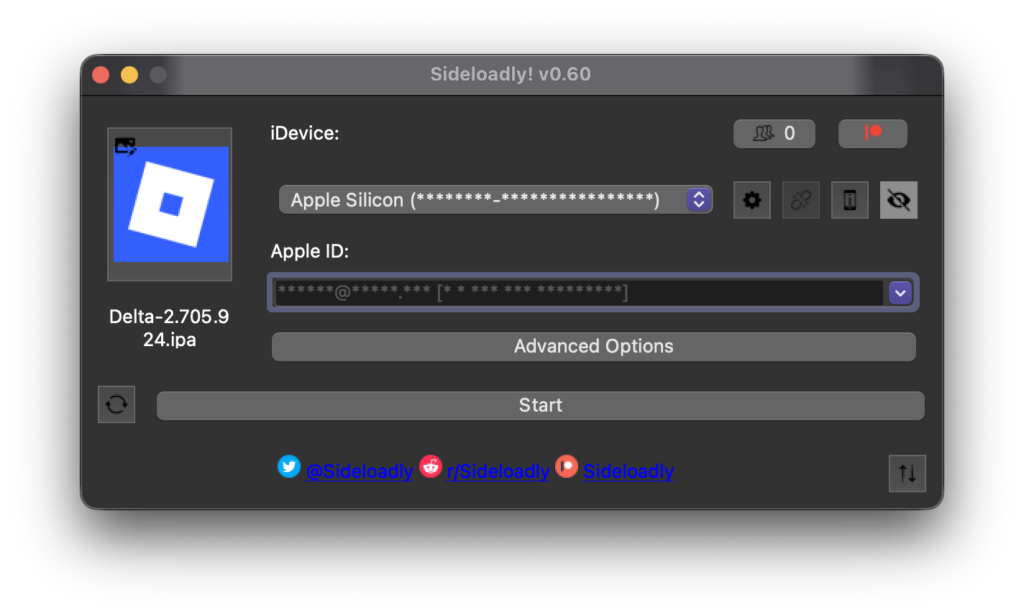
Alternative Method 2, IPA Installation with Sideloadly
Sideloadly is a popular tool for installing IPA files using a computer.
- Download the Delta IPA file
- Install Sideloadly on your Windows or macOS computer
- Connect your iPhone or iPad via USB
- Open Sideloadly and select the Delta IPA
- Enter your Apple ID credentials
- Click Start and wait for installation
- On your device, go to Settings, General, VPN & Device Management
- Trust the developer profile
This method provides more control and stability for advanced users.
You can also install Delta IPA with KSIGN, an iOS Application signer that is up to date:
Alternative Method 3, AltStore
AltStore uses a companion app and Apple ID signing.
- Install AltServer on your computer
- Install AltStore on your iOS device
- Download the Delta IPA from delta.bz
- Open AltStore and install the IPA
- Trust the profile in Settings
AltStore requires re signing every seven days for free Apple IDs.
Alternative Method 4, TrollStore
TrollStore allows permanent installation on supported iOS versions.
- Ensure your device and iOS version support TrollStore
- Download the Delta IPA from delta.bz
- Install using TrollStore
- Launch Delta without re-signing requirements
This is one of the most stable methods if supported, however, the last supported version for TrollStore is iOS 17.0. Here’s how to install TrollStore on iOS 17.0 and lower.
Method 5, ESign and KSign
These are advanced signing tools for users with certificates.
- Import your signing certificate
- Load the Delta IPA
- Sign and install
- Trust the profile
These methods are recommended for power users.
How to Install Delta Executor on Android
Android allows easier sideloading through APK files.
Enable Unknown Sources on Android
Before installing Delta, you must allow APK installations.
- Open Settings
- Go to Security or Privacy
- Enable Install Unknown Apps
- Allow your browser or file manager to install APKs
Install Delta Executor APK
- Open your browser
- Visit https://delta.bz/
- Download the Android APK
- Open the downloaded file
- Tap Install
- Launch Delta Executor once installed
No rooting is required.
How to Install Delta Executor on macOS
macOS users can install Delta using native builds or sideloading.
- Visit https://delta.bz/ and grab the IPA
- Download the macOS version
- Open the installer
- If blocked, go to System Settings, Privacy & Security
- Allow the app to run
- Launch Delta Executor
Some macOS versions may require additional permissions.
How to Use Delta Executor
- Launch Delta Executor
- Open Roblox through Delta
- Load a script from the built in library or paste your own Lua script
- Tap Execute or Run
- Control features through the GUI if available
Risks and Important Considerations
Using executors carries inherent risks.
- Roblox may suspend or ban accounts that violate their terms
- Scripts from unknown sources can be malicious
- Outdated executors increase detection risk
Best practices include:
- Using alternate Roblox accounts
- Only downloading from delta.bz
- Keeping Delta updated
- Avoiding suspicious scripts. Really… don’t go flying on the map…
Delta prioritizes security, but responsible usage is essential.
Frequently Asked Questions
Is Delta Executor safe to use
Delta Executor uses encrypted builds and verified releases, but no executor is completely risk free. Always use trusted scripts and alternate accounts.
Does Delta Work on iOS 26
Yes, Delta supports iOS 12 and newer, including iOS 26.
Do I Need a Computer to Install Delta on iOS
Not always. The Direct Install method works without a computer.
Can Delta run any Lua script
Delta supports most Roblox Lua scripts, though compatibility depends on the game and script design.
Is Delta free
Yes, Delta Executor is free to download and use.
How often is Delta updated
Updates are released regularly to match Roblox changes and improve performance.
Where should I download Delta Executor
Always download from the official site at https://delta.bz/ to avoid fake or malicious versions.
Final Thoughts
Delta Executor is one of the most capable Roblox executors available across mobile and desktop platforms. With secure installation, broad compatibility, and multiple installation methods, it offers flexibility that few competitors can match.
Whether you are exploring Lua scripting, automating gameplay, or enhancing your Roblox experience, Delta provides the tools you need when used responsibly.
For the safest and most reliable experience, always download Delta Executor from https://delta.bz/ and keep your installation up to date
More iDevice Central Guides
- iOS 17 Jailbreak RELEASED! How to Jailbreak iOS 17 with PaleRa1n
- How to Jailbreak iOS 18.0 – iOS 18.2.1 / iOS 18.3 With Tweaks
- Download iRemovalRa1n Jailbreak (CheckRa1n for Windows)
- Dopamine Jailbreak (Fugu15 Max) Release Is Coming Soon for iOS 15.0 – 15.4.1 A12+
- Cowabunga Lite For iOS 16.2 – 16.4 Released in Beta! Install Tweaks and Themes Without Jailbreak
- Fugu15 Max Jailbreak: All Confirmed Working Rootless Tweaks List
- iOS 14.0 – 16.1.2 – All MacDirtyCow Tools IPAs
- iOS Jailbreak Tools for All iOS Versions


