
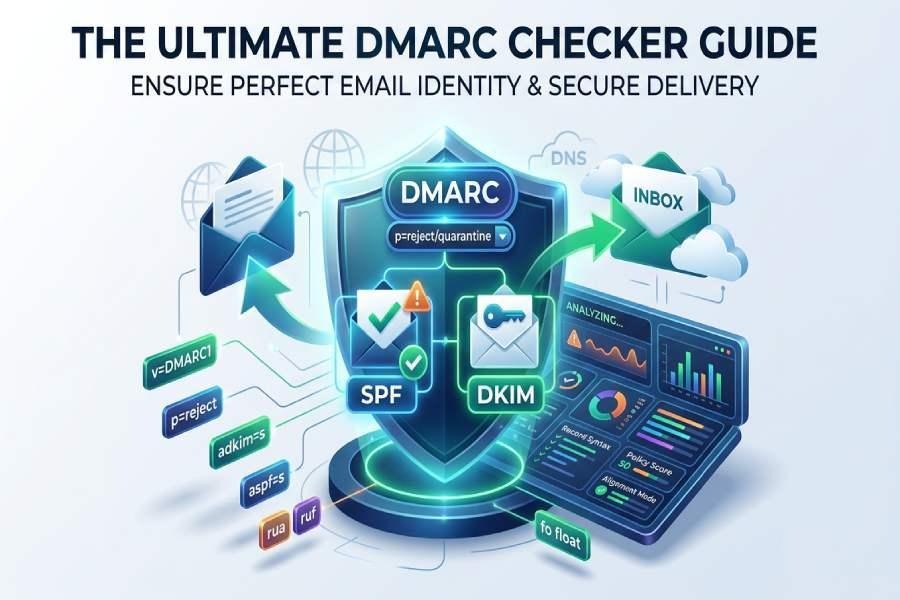
DMARC basics and why a checker matters: how SPF, DKIM, and DMARC work together to stop spoofing and improve inbox placement
How DMARC builds on SPF and DKIM
DMARC, or Domain-based Message Authentication, Reporting, and Conformance, enhances SPF and DKIM by introducing policies and feedback mechanisms. Outlined in RFC 7489, DMARC allows domain owners to create a DMARC record within DNS that dictates how email receivers should manage messages that do not pass authentication checks or alignment. SPF checks if the sender’s IP address is authorized for the domain, while DKIM employs a cryptographic signature linked to the domain specified in the d= field. DMARC ensures that the displayed From domain aligns with the identifiers from SPF and/or DKIM, addressing common spoofing vulnerabilities and bolstering both message authentication and validation.
Why a DMARC checker is essential for email deliverability
A specialized DMARC verification tool consistently examines your DNS entries, alignment, and reporting, serving as a diagnostic resource for your complete email authentication framework.
- Confirm the distribution of DMARC policies across subdomains and comprehend the results of enforcement.
- Conduct tests on DMARC records prior to implementing stricter policies, thereby reducing risk.
- Track DMARC validation signals from various providers and swiftly address any diagnostics that affect email integrity and security.
Related standards that amplify trust
- BIMI/bimi: Leverages DMARC enforcement to showcase brand logos in compatible inboxes.
- MTA-STS and TLS-RPT: Enhance security at the transport layer and offer insights into TLS-related problems.
- SPF/DKIM: Form the foundation for DMARC alignment; an effective DMARC record checker will also suggest reviewing SPF and DKIM settings.
What a DMARC checker actually tests: record syntax, policy strength (p, sp, pct), alignment modes (adkim, aspf), and reporting tags (rua, ruf, ri, fo)
Core tags and syntax a dmarc check tool verifies
- v: version, which must be DMARC1
- p, sp, pct: strength of the policy and its distribution across subdomains
- adkim, aspf: alignment modes for SPF/DKIM, with options for relaxed (r) or strict (s)
- rua, ruf, ri, fo: destinations and formats for aggregate and forensic reports
Additional considerations for syntax accuracy, such as semicolon placement, tag sequence, and spacing
In addition to fundamental DMARC checks, a reliable verifier also examines DNS records for SPF and DKIM, points out any alignment discrepancies, and identifies common errors, like the frequent “spfvspf” typo found in published DNS records.
Reporting and forensic options a checker evaluates
- rua: These are mailboxes or destinations designated for receiving consolidated XML reports. The DMARC validator ensures that the URI is correctly formatted and that permissions for external domains are valid.
- ruf: These endpoints are used for forensic reports, but many mailbox services impose restrictions on them. A DMARC diagnostic tool can track which reports are accepted.
- ri: This refers to the frequency of reports; when testing a DMARC record, the workflow may provide recommendations for effective intervals during implementation.
- fo: This covers options for reporting failures; your DMARC verification tool will alert you if overly detailed settings might generate excessive notifications.
How to run a DMARC check and read the results: typical outputs, common errors, and quick fixes for misconfigurations
Step-by-step: run a dmarc record lookup and validate dmarc
- To check the DMARC record for your domain, utilize a DMARC lookup tool or a DNS Record Checker. Tools such as MxToolBox SuperTool, EasyDMARC, or your own domain scanning software can simplify this process.
- Utilize the DMARC checking tool to analyze the DMARC record, ensuring that the syntax, policy, and alignment settings are correct.
- Conduct related lookups for MX records, SPF checks, and DKIM validations. Many services offer an email header analysis feature that allows you to examine headers from live emails and verify authentication results.
- Test DMARC effectiveness by sending emails from different platforms (like marketing, CRM, and ticketing) and checking that the From domain aligns with SPF and/or DKIM. Tools that include a report analyzer or XML report analyzer can help interpret the results.
Interpreting results, common errors, and quick fixes
- Whether a record exists or not, along with the extracted tags and their corresponding values
- The assessment of the policy (none/quarantine/reject) alongside the subdomain policy
- Status of alignment (adkim/aspf) and the DMARC results (pass/fail) for the latest samples
- The condition of the reporting setup (acceptance of rua/ruf, external validation)
- Associated diagnostics: absent DKIM keys, excessive SPF includes, or overly lengthy records
Typical outputs to expect
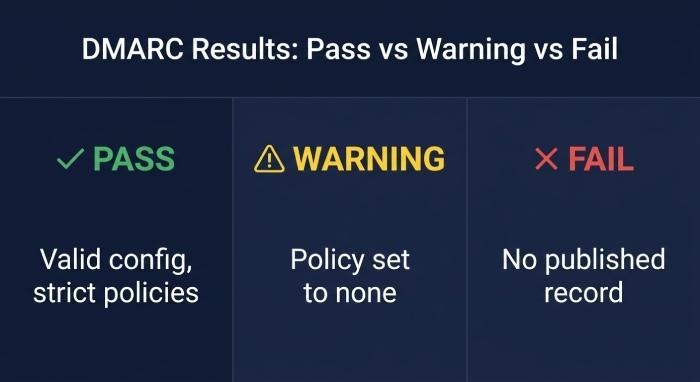
- Pass: A valid DMARC1 configuration exists with policies set to reject, both adkim and aspf are strict, and authorized rua addresses are correctly specified.
- Warning: The policy is set to none without any reporting; the percentage is not defined; external rua addresses need proper authorization.
- Fail: There is either no published record, the tags are incorrectly formatted, or there are typographical errors in the DMARC mechanism.
Quick fixes for misconfigurations
- No record: Establish a standard DMARC record using v=DMARC1; p=none; rua=mailto:aggregates@yourdomain.
- Misalignment: Ensure that the displayed domain matches the d= value in DKIM or the Return-Path domain in SPF; if you manage all sending domains, set adkim/aspf to strict.
- Reporting issues: Allow third-party destinations for rua/ruf reporting; check DNS delegation with your domain’s DNS providers.
- SPF/DKIM errors: Eliminate unnecessary nested SPF includes; refresh DKIM keys; verify the presence of the selector DNS. Utilize an email header analysis tool to validate results in real time.
Rollout with confidence: using a DMARC checker to move from p=none to quarantine/reject, analyze reports, and align all sending sources
Phased policy distribution from p=none to quarantine/reject
- Weeks 1–2: Set p=none, ri=86400, and fo=1, then use a reliable dmarc checker and diagnostic tools to establish a baseline of your email traffic and authentication performance. A managed DMARC service can also accelerate the assessment process by simplifying monitoring, reporting, and policy analysis.
- Weeks 3–4: Implement pct=25 alongside p=quarantine once testing of the DMARC record confirms that the main sources are passing. Gradually increase pct in increments (50, 75, 100).
- Final Stage: Transition to p=reject with adkim=s and aspf=s once alignment is confirmed. Employ a report analyzer or XML report analyzer to assess DMARC results at every stage.
Handling DMARC failure reports and feedback loops
Comprehensive reports (rua) reveal patterns in authentication and provide insights for monitoring reputation. Forensic reports (ruf) may indicate phishing attacks; combine these with a Phishing Link Checker and Alert Manager for enhanced security. Incorporate these insights into Delivery Center processes and the Reputation Monitor to safeguard sender reputation.
Align all sending sources and analyze reports
Catalog all systems that utilize your domain name for sending, including marketing tools (like EasySender), customer relationship management (CRM) platforms (such as Touchpoint), ticketing systems, human resources applications, and security awareness platforms (for instance, KnowBe4). Ensure that SPF and DKIM keys are accurately published, confirm DMARC alignment for each sending source, and eliminate any unapproved senders. Utilize a domain scanning tool and a DNS Record Checker to detect any unauthorized DNS records, along with an XML report analyzer to verify that policy distribution across subdomains (using sp tags) functions correctly.
Tool selection and ongoing monitoring tips: choosing a reliable DMARC checker, automating alerts, and meeting new Gmail/Yahoo bulk-sender requirements
Choosing a reliable dmarc lookup tool and ecosystem fit
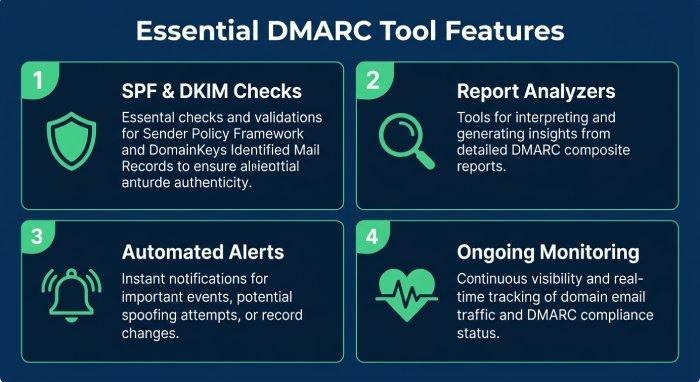
- Comprehensive Features: Includes integrated SPF and DKIM checks, MX record lookup, and the capability to analyze headers from active messages.
- Reporting Tools: Comes with a built-in report analyzer, XML report analysis, and an intuitive DMARC record generator.
- Automation Options: Features an API reference, options for scheduling, and alert notifications; provides multi-tenant views suitable for Managed Service Providers.
- Reputation and Support: Consider vendors like MxToolBox (SuperTool) and EasyDMARC, which provide Managed DMARC services, Reputation Monitoring, Domain Scanning, and educational resources. Review ratings on platforms like G2 Crowd, SourceForge, Expert Insights, and Channel Program directories. If managing multiple domains, explore participation in a Reseller or Wholesale Program.
Widely-used suites may offer Email Health dashboards, DNS Record Checker tools, and configuration wizards for easier setup. Confirm that the platform scales with your growth and can connect with your DNS Providers effectively.
Automating alerts, compliance, and bulk-sender requirements
Leading email service providers now mandate that bulk senders use authenticated emails aligned with DMARC standards.
- Proper alignment of SPF or DKIM with a successful DMARC pass for every campaign
- Reasonable settings for p, sp, and pct, along with accurate rua endpoints
- Prevention of spoofing across subdomains and maintenance of clean mailing lists
Ongoing monitoring and diagnostics essentials
Regularly test your DMARC records using a DMARC record checker to identify any unintentional modifications. Always validate your DMARC settings when adding new senders, rotating DKIM keys, or altering routing configurations. Conduct routine DNS and MX lookups to ensure your infrastructure remains consistent. Keep an eye on TLS through MTA-STS/TLS-RPT, and aim for BIMI implementation once you achieve a policy of p=quarantine or p=reject. Utilize Alert Manager for detecting anomalies, Reputation Monitor for tracking reputation, and Delivery Center for swift resolution of delivery issues.
More iDevice Central Guides
- iOS 17 Jailbreak RELEASED! How to Jailbreak iOS 17 with PaleRa1n
- How to Jailbreak iOS 18.0 – iOS 18.2.1 / iOS 18.3 With Tweaks
- Download iRemovalRa1n Jailbreak (CheckRa1n for Windows)
- Dopamine Jailbreak (Fugu15 Max) Release Is Coming Soon for iOS 15.0 – 15.4.1 A12+
- Cowabunga Lite For iOS 16.2 – 16.4 Released in Beta! Install Tweaks and Themes Without Jailbreak
- Fugu15 Max Jailbreak: All Confirmed Working Rootless Tweaks List
- iOS 14.0 – 16.1.2 – All MacDirtyCow Tools IPAs
- iOS Jailbreak Tools for All iOS Versions


