
In the age of streaming, our music libraries are no longer physical collections but digital playlists living in the cloud. Services like Apple Music offer an unparalleled convenience, granting access to over 100 million songs for a monthly fee. Yet, a common frustration remains: what happens when your subscription ends, your internet connection drops, or you want to enjoy a curated playlist on a device that doesn’t support the app? The music vanishes.
This limitation highlights a critical need—the ability to truly own your favorite audio content by downloading it for permanent, offline use. If you’ve ever searched for “how to download music from Apple Music to MP3,” you’ve likely discovered that it’s not a built-in feature. This is where dedicated tools like ViWizard Streaming Audio Recorder come into play, providing a powerful and legal solution for music enthusiasts who want to liberate their audio.
Understanding the “Download” Feature on Apple Music
First, it’s essential to clarify what Apple Music means by “download.” When you tap the download icon (a cloud with a downward arrow) next to a song or album within the app, you are not creating a standalone, universal audio file like an MP3. Instead, you are saving a temporary, encrypted copy to your device.
These files are protected by Digital Rights Management (DRM), a technology designed to prevent unauthorized copying and distribution. This means:
- Subscription Dependency: The downloaded songs are locked to your Apple Music account. If you cancel your subscription, these files become unplayable.
- Platform Lock-in: You can only play these files within the Apple Music app or on authorized devices linked to your account. You cannot burn them to a CD, transfer them to a non-Apple music player, or use them in creative projects.
- Limited Device Compatibility: They cannot be played on many car stereos, MP3 players, or other devices that recognize only standard formats like MP3, FLAC, or WAV.
This is not true ownership; it’s a leased listening experience. For those who want to build a personal, lasting music library, a different approach is required.
Why You Might Want to Download Streaming Audio Permanently
The desire to download streaming audio isn’t about piracy; it’s about practicality, preservation, and personal freedom.
- Permanent Ownership: Build a personal music library that isn’t tied to a monthly fee. Your music remains accessible even if you decide to switch to a different streaming service or if a song is removed from the platform’s catalog.
- Uninterrupted Offline Listening: Enjoy your music anywhere, anytime—on flights, during road trips through areas with poor reception, or at the gym—without worrying about data usage or app authorization.
- Device Compatibility: Convert songs into universal formats like MP3 to play on any device, including USB car stereos, dedicated MP3 players, smart home speakers, and more.
- Creative Projects: Use high-quality audio clips for personal projects like YouTube videos, podcasts, presentations, or wedding playlists without the legal grey area of screen recording with system audio.
Introducing ViWizard Streaming Audio Recorder: Your Audio Liberation Tool
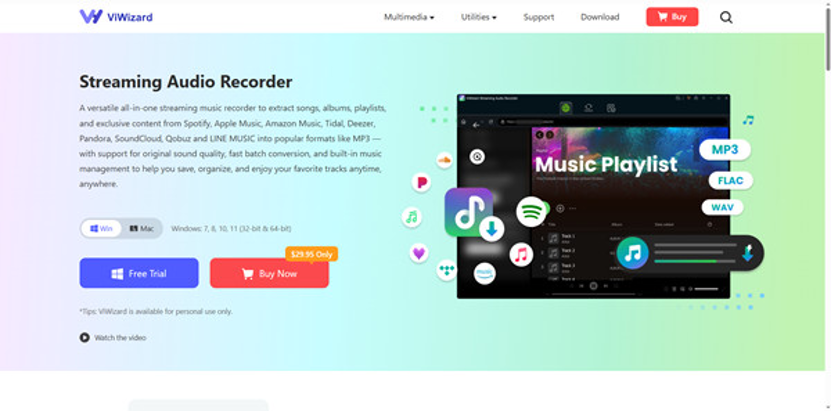
So, how do you bridge the gap between the streaming world and true audio ownership? The most reliable and high-fidelity method is using a specialized audio recorder. ViWizard Streaming Audio Recorder stands out as a premier solution designed specifically for this purpose.
ViWizard is a desktop software that acts as a virtual audio capture device. It doesn’t hack or break Apple Music’s encryption. Instead, just a few steps away, ViWizard can easily capture audio from popular music streaming platforms, such as Apple Music, Spotify, Pandora, and more.. This method ensures you get the best possible sound quality without any legal infringement for personal use.
How to Download Apple Music Songs with ViWizard
The process is remarkably straightforward, requiring no technical expertise.
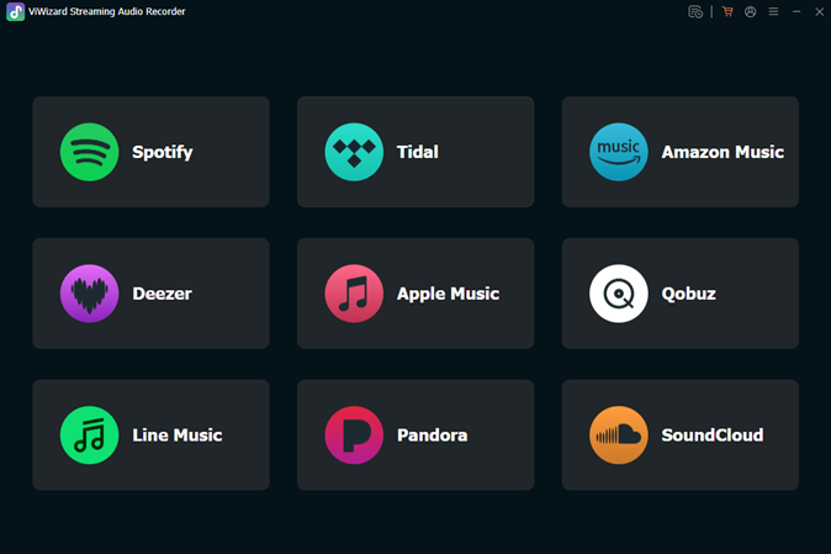
Step 1: Download and Install
Visit the official ViWizard website and download the software for your operating system (Windows or macOS). Follow the simple installation instructions.
Step 2: Configure Audio Settings
Launch ViWizard. Before you start, go into the settings menu to select your preferred output format (MP3, M4A, WAV, etc.), audio quality (up to 320 kbps MP3 or lossless quality), and the output folder where you want your files saved. You can also customize the file naming convention using tags like Title, Artist, and Album.
Step 3: Select the Audio Source
In the ViWizard interface, select the Apple Music section and you’ll be taken to the Apple Music web player. Simply log in to your account and you’ll see your entire music library.
Step 4: Import Apple Music Tracks to ViWizard
Browse your music library, select your desired tracks, open them, and click the + button to import them into ViWizard’s conversion task.
Step 5. Start the Apple Music Conversion
Go to the Converting panel and click the Convert button in the bottom right corner. ViWizard will immediately begin the download of Apple Music to MP3 at a fast speed. Just wait a moment and the conversion will complete.
Step 6: Edit Your Files
ViWizard will save the file and present it in its built-in library. Here, you can easily edit the ID3 tags (song name, artist, album, cover art, etc.) to keep your new library perfectly organized.
Why Choose ViWizard Over Other Methods?
You may find browser extensions or other software that promise free downloads. However, these often come with significant risks and drawbacks:
- Poor Quality: Many free converters only capture low-bitrate audio or use the sound from your microphone, resulting in tinny, unusable files.
- Malware Risks: Downloading software from unverified sources can infect your computer with viruses or adware.
- Unreliability: Free online converters are often slow, have file size limits, and can be shut down at any time.
ViWizard offers a secure, professional, and user-friendly experience. It provides:
- High-Fidelity Output: Record in lossless quality or high-bitrate MP3
- Efficiency: Record songs, playlists, or podcasts 1:1 faster than real-time playback.
- Automatic Sorting: Split recordings into individual tracks and tag them automatically.
- Safety: A clean, reputable software from an official source, ensuring your computer’s security.
Build Your Legacy Library Today
Music is a personal journey and a lifelong passion. While streaming services offer incredible access, true music lovers understand the value of a permanent collection. ViWizard Streaming Audio Recorder empowers you to reclaim your audio freedom, curating a personal library that you truly own and control.
Stop renting your music and start building a legacy. Download ViWizard today and transform your favorite Apple Music streams into a timeless collection you can enjoy forever, on any device, anywhere in the world. Visit the ViWizard website to learn more and start your first recording.
More iDevice Central Guides
- iOS 17 Jailbreak RELEASED! How to Jailbreak iOS 17 with PaleRa1n
- How to Jailbreak iOS 18.0 – iOS 18.2.1 / iOS 18.3 With Tweaks
- Download iRemovalRa1n Jailbreak (CheckRa1n for Windows)
- Dopamine Jailbreak (Fugu15 Max) Release Is Coming Soon for iOS 15.0 – 15.4.1 A12+
- Cowabunga Lite For iOS 16.2 – 16.4 Released in Beta! Install Tweaks and Themes Without Jailbreak
- Fugu15 Max Jailbreak: All Confirmed Working Rootless Tweaks List
- iOS 14.0 – 16.1.2 – All MacDirtyCow Tools IPAs
- iOS Jailbreak Tools for All iOS Versions


